
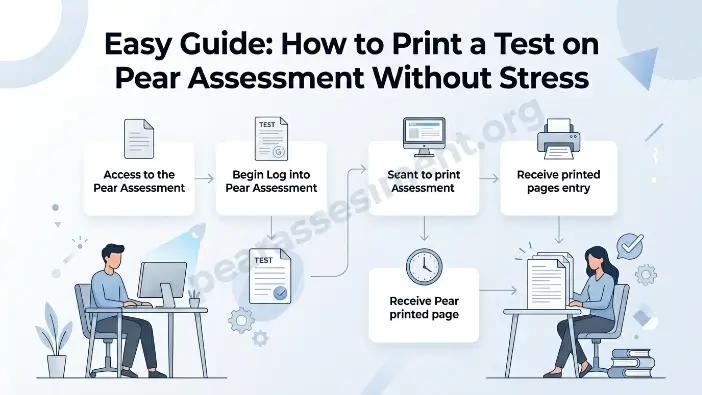
Welcome to Pear Assessment. How to print a test on Pear Assessment refers to making a physical copy of your online test through the Pear Assessment platform. It lets teachers convert digital quizzes into printed pages. This can be useful when students require paper copies rather than using screens. The process generally involves opening the test, choosing the print option, and selecting the desired format. Once you know the steps, it is quite simple.
Many teachers find printing confusing when they do it for the first time. The necessary buttons may not always be obvious. Some settings can also seem complicated. You might be concerned about leaving out questions or having incorrect formatting. However, printing a test does not need to be difficult. Following the correct steps can help you complete the process quickly and easily.
In this guide, you will discover how to print a test on Pear Assessment in a simple way. We will explain the basic steps along with useful tips. You will also learn about key settings and common issues. By the end, you should feel prepared to print your tests confidently without unnecessary problems.
What is Pear Assessment?
Pear Assessment is an online tool that teachers use to create and manage assessments. It supports quizzes, assignments, and interactive questions. Teachers can distribute these tests to students online. The platform also offers automatic grading and fast feedback. This helps save time and makes teaching more efficient.
The platform is widely used in schools because it is straightforward to operate. Teachers can monitor student progress and view results in real time. Pear Assessment supports various question formats, including multiple choice and short answers. Although it is primarily a digital tool, it also provides printing options. This makes it suitable for both online and offline classroom environments.
Read Also: Why Is Edulastic Now Pear Assessment? The Surprising Truth Explained Clearly
Why You Might Need to Print a Test
Teachers often require a paper copy of an online test. It can be useful in many real classroom situations. While digital tools are convenient, paper-based tests remain important. Printing provides more flexibility and control during exams. It also allows every student to take the test without facing technical problems or screen-related distractions.
Printed tests are useful for organization and backup purposes as well. They make it easier to conduct exams in schools. Teachers can manage the available time more effectively and avoid device-related problems. It is a straightforward way to keep assessments organized, smooth, and dependable.
No Internet or Device Access
Some students may experience issues with internet access or devices. Not everyone has a laptop or a reliable connection. In these situations, a printed test provides equal access to everyone. It removes digital barriers and lets every student complete the exam fairly without interruptions or technical problems in the classroom.
Better Focus and Exam Control
A printed test can help students concentrate better. Screens may create distractions through notifications or glare. Paper-based exams reduce these concerns and support better focus. Teachers also have greater classroom control. They can monitor students and manage the exam setting more easily without technical interruptions or device-related difficulties.
Step-by-Step Guide: How to Print a Test on Pear Assessment
Printing a test on Pear Assessment is straightforward when the proper steps are followed. Teachers often use this feature to turn digital assessments into paper-based exams. It is especially useful in classrooms where online devices are unavailable. Although the process is simple, following each step carefully helps prevent mistakes.
With the correct platform options, you can quickly change your test into a format suitable for printing. Before printing, you can also select settings such as answer keys and page layout. This helps make the final paper more practical for teachers and students.
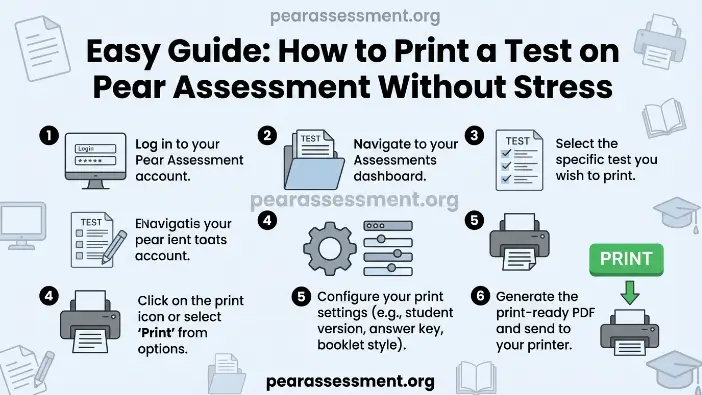
Log in and Open Test Library
Begin by signing in to your Pear Assessment account with your credentials. Then, open the Test Library section. This area contains the tests you have created. Choose the test you want to print. Before continuing, confirm that the test is complete and has been saved correctly.
Select Print Option and Settings
Open the test you selected and locate the action or menu button. Select the print option. Choose the settings you need, such as the answer key, layout, or format. Review these options carefully. Doing so helps ensure your printed test is complete, properly formatted, and ready for classroom use without missing information or errors.
Understanding Print Settings
Print settings in Pear Assessment let you control the appearance of your test on paper. These options matter because they determine the final printed format. Teachers can select different settings before printing, including layout, answer keys, and instructions. Understanding these choices helps make the printing process easier and reduces errors.
When the settings are selected correctly, the printed test becomes clearer and easier to use. It can also improve the overall exam experience for students. Teachers can adjust the paper according to classroom requirements. This flexibility makes Pear Assessment useful for both digital and paper-based teaching environments.
Answer Key Settings
The answer key setting lets teachers decide whether correct answers should appear with the test. You can include them when checking student performance or remove them when preparing a student copy. This setting makes it easy to create different versions of the same printed test.
Layout and Format Options
Layout settings determine how questions are displayed on the printed page. You can change spacing, font size, and page order. A suitable layout keeps the printed test clear and easy to understand. It also reduces confusion during exams. Proper formatting allows students to concentrate and complete the assessment more comfortably.
Tips to Make Printing Easier and Faster
Printing tests through Pear Assessment can be simple when you use a few helpful tips. Taking a few smart steps can save time and reduce mistakes. These suggestions help teachers prepare accurate printed tests with less stress. They can also make the printing process faster and more efficient.
- Always Preview Before Printing: Review the test layout before printing. This helps identify mistakes early and prevents unnecessary reprints.
- Use PDF Format: Saving the test as a PDF provides a clean and stable print version. It can also help prevent formatting problems.
- Keep Test Simple: Avoid complicated designs. Simple tests usually print faster and are easier for students to read.
- Check Printer Settings: Confirm that your printer is ready before printing. Using the correct settings can improve the quality of the printed test.
Advantages of Printing Tests from Pear Assessment
Printing tests through Pear Assessment offers useful benefits for both teachers and students. It supports flexible learning when devices are unavailable. It also combines traditional testing methods with modern educational tools. This makes education more flexible and accessible for different learners.
- Offline Accessibility: Printed tests work without an internet connection or digital devices. This is useful for students in remote areas or when connectivity problems occur.
- Easy Classroom Use: Teachers can distribute paper tests quickly. This saves time and helps keep the exam process organized.
- Better Focus: Students may find it easier to concentrate on paper than screens. This can reduce distractions and support better performance.
- Flexible Assessment: Teachers can combine digital and printed exams. This provides a balanced and flexible evaluation approach for all students.
Frequently Asked Questions
Can I customize questions before printing a test on Pear Assessment?
Yes, teachers can edit or adjust questions before printing. This helps in creating different difficulty levels or versions of the same test.
Does Pear Assessment support printing multiple test versions?
Yes, you can generate multiple versions with shuffled questions. This is useful to reduce cheating in classroom exams.
Can I print a test without an answer key?
Yes, you can choose to exclude the answer key in print settings. This is useful when giving tests directly to students.
Is the internet required while printing a test?
The Internet is only needed to access the platform. Once the test is loaded, you can print or save it as a PDF offline.
Can printed tests be reused later?
Yes, teachers can reuse printed tests by saving them as templates or reprinting the same assessment anytime when needed.
Conclusion
Printing a test on Pear Assessment is a simple and useful process. It helps teachers turn digital tests into paper format easily. This is helpful in many classroom situations where online tools are not available. The process becomes smooth when each step is followed correctly. Teachers can also adjust settings to match their needs.
Overall, printed tests make exams more flexible and reliable. They reduce technical issues and improve classroom management. Students can focus better on the paper, and teachers can conduct exams without stress. With the right approach, printing becomes fast, easy, and effective for daily teaching needs.